The depth and thickness uncertainty workflow
Upgrade to a new 'Depth and Thickness Uncertainty' workflow as of version 2020.4
The 'Depth and Thickness Uncertainty' workflow is an upgrade to the previous 'Structural Uncertainty' workflow which exists in version 2020.3 (and previous) in the application. The new workflow contains a hierarchical depth/thickness uncertainty parameterization and an additional ‘multiplier’ method (i.e. for bulk shifts) next to the existing stochastic approach with SGS.
If you open a solution with uncertainty parameters that have been saved in the previous 'Structural Uncertainty' workflow, these parameters cannot be automatically migrated to the new 'Depth and Thickness Uncertainty' workflow. Upon opening such a solution, you are prompted with the following warning:
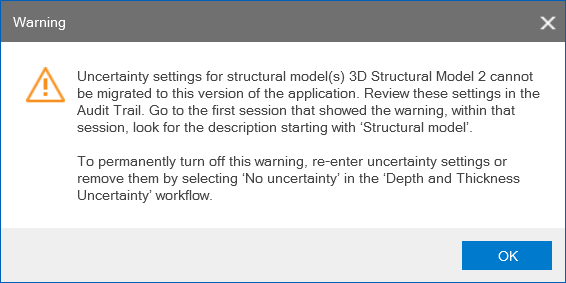
 To switch off the warning
To switch off the warning permanently, open the Assign Method form in the new Depth and Thickness Uncertainty workflow (model > 3D Structure). Select 'No uncertainty' from the drop-down and click Apply/OK at the base of the form. Once you have saved the solution the message will no longer appear upon re-opening.
Settings generated in the previous 'Structural Uncertainty' workflow (version 2020.3 and older) are not automatically migrated to the new 'Depth and Thickness Uncertainty' workflow (version 2020.4 and younger). In case you want to apply the same uncertainty settings to your structural model, you have to enter these settings manually in the new workflow:
- To verify previously used settings, go to the Audit Trail (home > Audit Trail > Open) in the solution where the above warning showed up. In the Audit trail, go to the first session where this warning showed up and within that session look for the description starting with 'Structural model: <name of the model> has incompatible uncertainty settings'. Hover over the description to read the settings (and Ctrl+Copy and paste them in a text editor to see the full text). Then re-enter these settings in the new 'Depth and Thickness Uncertainty' workflow.
- When re-entering similar settings in the new, upgraded workflow, for the majority of scenarios it is expected that exact reproduction of the same results is not achieved:
- When, in the new workflow, you apply the same SGS settings to the same uncertain zones/surfaces, due to the hierarchical calculation, the result will vary compared to the previous results.
- Due to a new distinction between seismic and sub-seismic surfaces plus the fact that uncertainty is now applied to intervals instead of zones in the structural model, some zones might not even be selectable.
The Depth and Thickness Uncertainty workflow
With the depth and thickness uncertainty workflow (model > 3D Structure > Depth and Thickness Uncertainty) you can investigate the impact of uncertainty of your structural model on your gross rock volume (GRV). Uncertainty around the structural model is often one of the main sources of uncertainty in the estimation of hydrocarbons-in-place, as its interpretation typically involves uncertainties related to seismic imaging, velocity modeling and horizon picking.
As opposed to conventional methods such as depth uncertainty quantification via map-based volumetrics or GRV multipliers, the depth and thickness uncertainty workflow works in 3D and directly on the JewelGrid. Depth and thickness uncertainty is applied via flexing of the depth of structures (thickness is converted into depth in this respect), using depth shift maps. This makes the depth uncertainty 'implicit'. Two methods are provided to generate these maps: Sequential Gaussian Simulation (SGS) and a Multiplier method. When performing uncertainty calculations with the Volumetrics Study workflow of the study strip, realizations are generated by sampling the respective uncertainty parameter. With the Volumetrics Study workflow of the study strip, depth and thickness uncertainty can be studied independently as well as in combination with FWL depth uncertainty.
If you want to represent uncertainty around the structural model in the form of low, mid (reference) and high case scenarios, then it is recommended to not use the Depth and Thickness Uncertainty uncertainty workflow, but create three different volumetric concepts with the Volumetric Concepts workflow of the concept strip. The Depth and Thickness Uncertainty workflow in the application is meant for studying structure-related uncertainty (perturbation) around base case structural models.
Before you use the Depth and Thickness Uncertainty workflow, it is strongly recommended to read the following topics:
Concept of depth and thickness uncertainty in the application
For the uncertainty workflow steps, see:
Settings for depth uncertainty
Settings for thickness uncertainty ('seismic' intervals)
Settings for thickness uncertainty ('sub-seismic' intervals)
To QC your uncertainty settings, see:
To use implicit depth realizations as input to reservoir simulation, see:
Using implicit depth uncertainty realizations in dynamic simulation